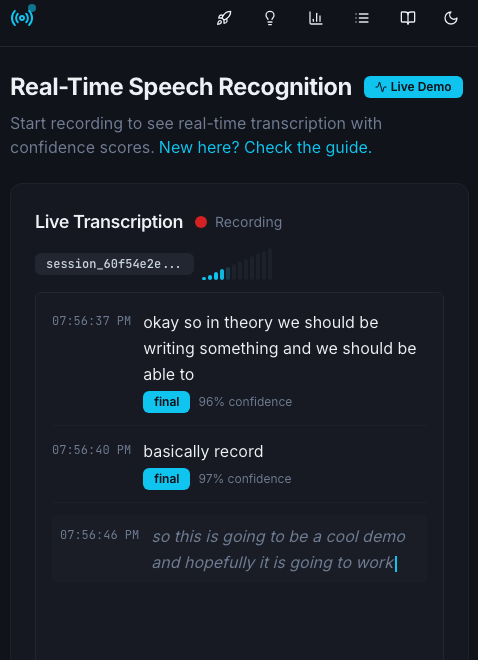
A production-ready real-time Automatic Speech Recognition service using browser APIs and WebSocket streaming.
https://github.com/davidbmar/browser-Speech-to-Text-realtime-ASR · public · shipped
VoiceStream ASR is a full-stack TypeScript application that provides real-time speech-to-text transcription. It acts as the 'ears' layer for voice-enabled applications, leveraging the browser's native Web Speech API to capture audio and an Express backend to manage sessions, store transcripts, and stream updates via WebSockets. It requires no external cloud ASR API keys.
git clone https://github.com/davidbmar/browser-Speech-to-Text-realtime-ASR.git
cd browser-Speech-to-Text-realtime-ASR
npm install
npm run dev
flowchart TD
    subgraph Client[Browser Client]
        Mic[Microphone Input]
        WebSpeech[Web Speech API]
        ReactUI[React UI Components]
        WS_Client[WebSocket Client]
        REST_Client[REST API Client]
    end

    subgraph Server[Express Server]
        WS_Server[WebSocket Server /ws]
        REST_API[REST API /api/*]
        SessionMgr[Session Manager]
        Storage[(Storage / In-Memory)]
    end

    Mic --> WebSpeech
    WebSpeech --> ReactUI
    ReactUI --> WS_Client
    ReactUI --> REST_Client

    WS_Client <-->|Stream Transcripts| WS_Server
    REST_Client <-->|Manage Sessions| REST_API

    WS_Server --> SessionMgr
    REST_API --> SessionMgr
    SessionMgr --> Storage
The project uses a monorepo-style structure with a React frontend (Vite, Tailwind CSS, shadcn/ui) and an Express.js backend. The backend handles REST API requests for session management and WebSocket connections for real-time data pushing. Data persistence is handled via Drizzle ORM (configured for PostgreSQL in config, though README mentions in-memory storage for the demo). The build process uses esbuild for the server and Vite for the client.
sequenceDiagram
    participant User
    participant Browser as React Client
    participant Server as Express Backend
    participant Storage as Session Store

    User->>Browser: Click Start Recording
    Browser->>Server: POST /api/sessions
    Server->>Storage: Create Session ID
    Server-->>Browser: Return Session ID

    Browser->>Server: Connect WebSocket /ws?sessionId=...
    Server-->>Browser: Connection Established

    loop Speech Input
        User->>Browser: Speak
        Browser->>Browser: Web Speech API Process
        Browser->>Server: Send Transcript Update (via WS or Internal)
        Server->>Storage: Save Transcript
        Server->>Browser: Push Real-time Update (WS)
        Browser->>User: Display Text & Confidence
    end

    User->>Browser: Stop Recording
    Browser->>Server: POST /api/sessions/:id/end
    Server->>Storage: Finalize Session
Integrate this service as the transcription engine for voice assistants, meeting transcription tools, or conversational AI agents. Use the REST API to create sessions and the WebSocket endpoint to receive live partial and final transcripts with confidence scores. It can be extended by connecting the transcript output to an LLM for response generation.