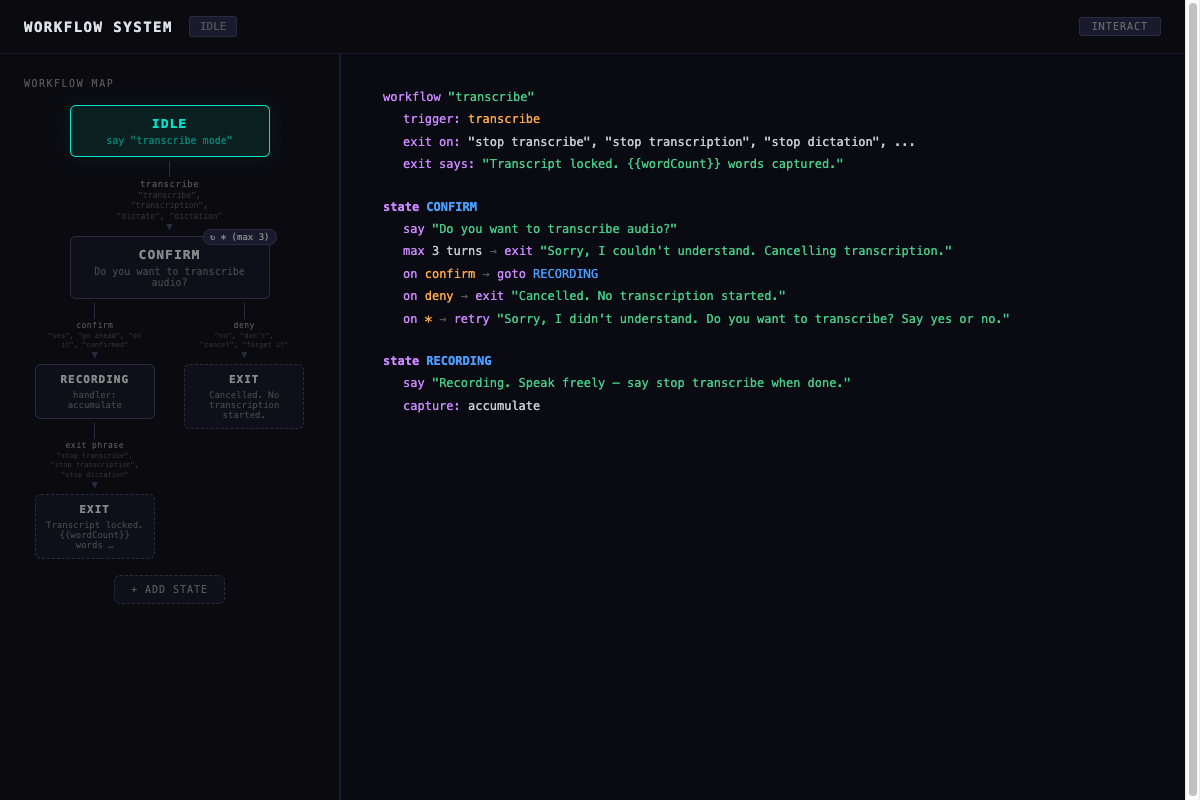
A visual editor and runtime engine for declarative, multi-turn conversational workflows defined in JSONL.
https://github.com/davidbmar/speaker-workflow-system · public · shipped
A vanilla TypeScript application that allows developers to define stateful conversation flows (like transcription or data collection) using a simple JSONL format. It provides a split-pane UI: an interactive graph editor on the left and a linked, color-coded pseudocode view on the right. The system includes a runtime engine that processes user input, manages state transitions, handles intent classification via keywords, and supports features like speech accumulation and template variable resolution.
npm install
npm run dev
flowchart TD
    User[User] -->|Input Text/Voice| UI[demo.ts UI Layer]
    UI -->|Classify Intent| IC[intentClassifier.ts]
    UI -->|Trigger Action| WM[workflow.ts Engine]
    WM -->|Load Def| JSONL[data/workflows.jsonl]
    WM -->|Execute Handler| WH[workflowHandlers.ts]
    WM -->|Update State| UI
    UI -->|Render Graph| WMap[workflowMap.ts]
    UI -->|Render Code| CView[codeView.ts]
    WMap -->|Click Node| NE[nodeEditor.ts]
    CView -->|Click Line| NE
    NE -->|Update Def| WM
Built with Vite and TypeScript using pure DOM manipulation (no frontend framework). The architecture separates concerns into a workflow engine (state machine), intent classifier (keyword-based), visual map renderer (SVG connectors), code view generator (pseudocode), and editor modules (node/arrow editing). State is managed via a central app context with a callback bag pattern to avoid circular dependencies between UI components and the engine.
sequenceDiagram
    participant U as User
    participant UI as demo.ts
    participant IC as intentClassifier.ts
    participant WF as workflow.ts
    participant WH as workflowHandlers.ts

    U->>UI: Types/Speaks Input
    UI->>IC: classifyIntent(input)
    IC-->>UI: { intent, score }
    UI->>WF: processAction(intent)
    WF->>WF: Resolve Current State
    WF->>WF: Check Transitions
    alt Has Handler
        WF->>WH: executeHandler(state.handler, input)
        WH-->>WF: Updated Context
    end
    WF->>WF: Determine Next State
    WF-->>UI: { message, nextState, context }
    UI->>U: Display Message & Update Graph Highlight
Use this system to prototype and debug complex multi-turn dialogues without writing imperative code. Define your flow in `data/workflows.jsonl`, visualize it in the browser, test interactions in real-time, and export the JSONL definition for integration into larger voice or chat applications. It serves as a reference implementation for declarative state machines and bidirectional UI-code linking.